Well-Architected Application Landing Zone
0. Identify Ground Base
Description: Take into account the building blocks that you have already.
Example: I have already requested a landing zone from Cloud Solutions team - and after the successful delivery, I already have one or more:
- Virtual Network
- Network Security Group
- User-Defined Route Table
1. Know What You Want
Description: Clearly state what you want to have in your landing zone.
Example: I want to have 1 premium function app and 1 flex consumption function app to handle my FaaS workloads.
- Premium function app will be used with
TimerTriggerthat runs every day in the morning that sends mails to users who have forgotten to update their passwords. - Flex function app will be used with
HttpTriggerwhich will be called from one of our backend APIs for image processing.
2. List Out Dependencies
Description: Based on the statement you make at first step, visualize the dependency graph for your core workload, up until the building-block resources.
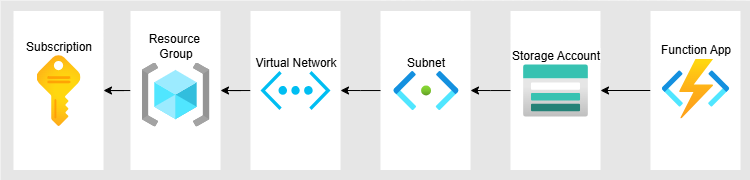
Example: My function apps will have dependency on subnets (for inbound and outbound connectivity), storage accounts (for storage purposes) and resource groups (to collect resources that have same lifecycle into a group).
3. Design
Description: Think about how resources on Azure will be grouped and connected with one and other. Do not focus on resource names (it will be handled automatically) - just design how they will be integrated.
Example:
- I want separate storage account for both of my function apps (1:1 relationship).
- Each of my function apps will have a dedicated subnet for inbound and outbound connectivity. Outbound connectivity subnets should have delegation to
Microsoft.Apps/environmentsandMicrosoft.Web/serverFarms. - For each of my function apps, I want to have seperate resource groups, one for flex function app - one for premium function app. These resource groups will contain storage accounts too.
- Storage accounts, which will be used by my function apps, should have inbound connection too - that’s why, I need one more subnet for this access.
- In total, I need:
- 2 resource groups
- 2 storage accounts
- 2 function apps
- 5 subnets
- 1 for function apps’ inbound connectivity (one address prefix for both of them)
- 1 for premium function app’s outbound connectivity (delegated to
Microsoft.Web/serverFarms) - 1 for flex consumption function app’s outbound connectivity (delegated to
Microsoft.Apps/environments) - 2 for storage accounts’ inbound connectivity (private endpoints for blob, queue, table)
4. Resource Naming
Description: Answer the following question for each resource that will be deployed: ‘“Is this a dedicated resource for a single solution, or a shared resource to be used by many?’. If first, then stick to the same solution name; if latter, find a generic name that serves the best name for its use case.
Example:
- Function Apps: Dedicated Resource -> their solution names will be ‘updpassprem’ and ‘improcflex’.
- Storage Accounts: Dedicated Resource -> their solution names will be ‘updpassprem’ and ‘improcflex’.
- Resource Groups: Dedicated Resource -> their solution names will be ‘updpassprem’ and ‘improcflex’.
- Inbound Function App Connectivity Subnet: Shared Resource -> its solution name will be ‘inbfacon’.
- Premium Function Outbound Connectivity Subnet: Dedicated Resource -> its solution name will be updpassprem.
- Flex Consumption Function App Outbound Connectivity Subnet: Dedicated Resource -> its solution name will be improcflex.
- Storage Accounts Inbound Connectivity Subnet: Shared Resource -> its solution name will be ‘inbsacon’.
5. Dependency Observation
Description: Oversee the dependency diagram of the resources - start stating deployment parameters from the core resource. Bicep handles dependencies among resources regardless of how you order your resources in your code - however, this practice allows us to have a better view of the overall infrastructure.
Example:
- I need to have resource groups, storage accounts, function apps and subnets. Let’s list their dependencies:
- Resource Groups: Needs Subscription (which was already provided by landing zone deployment) (1 dependency)
- Storage Accounts: Needs Subnet for Private Endpoint, needs Resource Group (2 dependencies)
- Function Apps: Needs Resource Group, Storage Account, Subnet (3 dependencies)
- Subnet: Needs Virtual Network (which was already provided by landing zone deployment) (1 dependency)
- So, we can list parameters of resources in the following order:
- Resource Group
- Subnet
- Storage Accounts
- Function Apps
6. Construct Layered Deployment
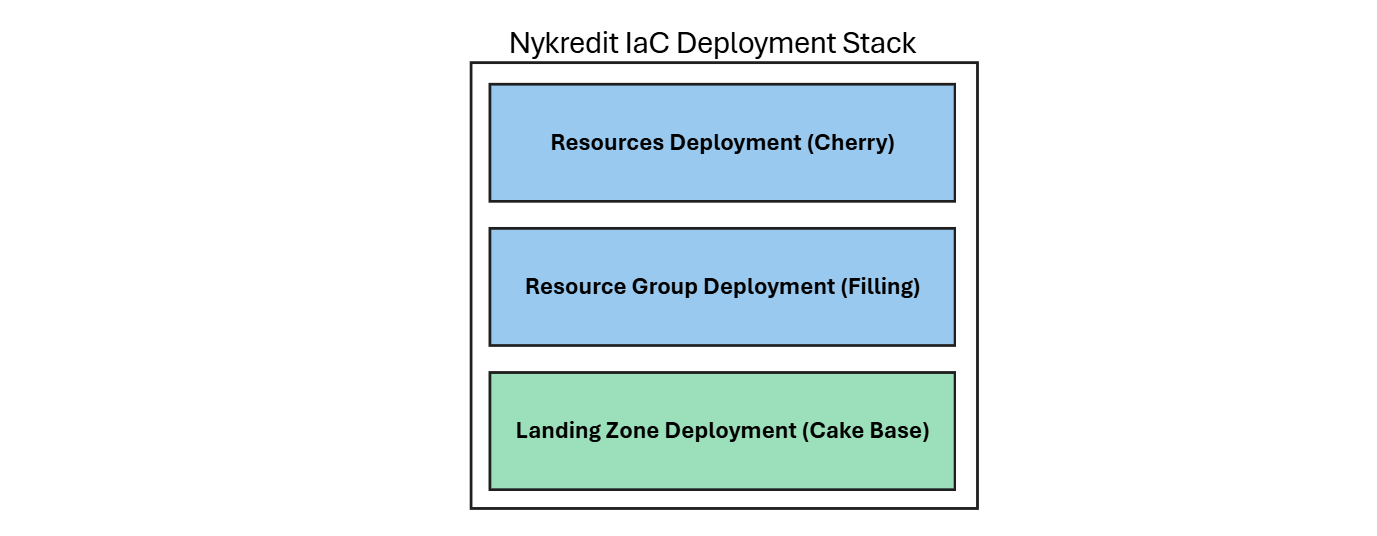
Description: Bicep needs to know the targetScope of the resource before the deployment begins. Meaning that, we have to create resource groups first; then the rest of the resources. Think of it like a cake: first cake-base, then the filling (resource groups), and cherry-on-top (rest of the resources). As part of the landing zone delivery, cake-base is already in our hands (Virtual Network, Shared Resource Group, NSG and RT).
Example:
- Thanks to the standardized naming convention
<resource_type>-<solution_name>-<environment>-<location>-<instance>, I am aware that resource group names will become: rg-updpassprem-prod-gwc-01 and rg-improcflex-prod-gwc-01. - Each of the resource, that will be deployed in these resource groups, must explicitly declare
dependsOnon resource group deployment module - since there is not any dependency set implicitly.